Activation
Outside of planned exercises and events, PACT may be activated during emergencies or other incidents requiring auxiliary communications. PACT will only be activated under the direction of Provo's Emergency Manager.
PACT members should only mobilize if instructed to do so. Self-activation can create confusion, increase risk, and place additional strain on emergency resources.
Activation Notification
PACT members will be notified of an activation through Telegram Messenger and Everbridge. These systems may continue to function during disruptions to cellular service, provided members have an alternative internet connection such as Wi-Fi.
Members are strongly encouraged to enable Wi-Fi calling on their mobile devices to improve the likelihood of receiving activation messages during a major network outage.

Telegram Messenger
Telegram Messenger is a free cloud-based messaging app used for PACT group communication and activation notifications.
PACT members must download the Telegram app and join the PACT group chat to receive notifications.
New members will receive the Telegram group invite link in a welcome email. Members will also be given access to a PACT Telegram Bot for additional assistance.

Everbridge
Everbridge is a mass notification and emergency management system used by local governments.
Upon joining, PACT members are automatically enrolled in the PACT Everbridge notification group.
Provo's Emergency Manager can use Everbridge to send notifications through multiple delivery methods, including mobile alerts, email, VoIP/Wi-Fi calling, and IPAWS pathways.
When Activated
When PACT is activated, members should follow the activation sequence outlined below.

Safety First
PACT members should only mobilize when they and their households are safe and secure. Your first priority is your personal and family safety.

Monitor
If an activation notification is received or anticipated, monitor 439.800 MHz until Net Control starts the emergency net.
Check In
When directed, check in with Net Control. Report your availability, location, and capabilities. Be ready to receive an assignment.

Deploy &
Report
Carry out your assignment as directed. Maintain contact with Net Control, provide status updates, and report any concerns or changing conditions.
Integration With Provo's EOC
During an activation, PACT supports Provo’s Emergency Operations Center (EOC) by helping move information from the community to city decision-makers.
The diagram below illustrates Provo’s Incident Command System (ICS) structure and PACT’s role within it.
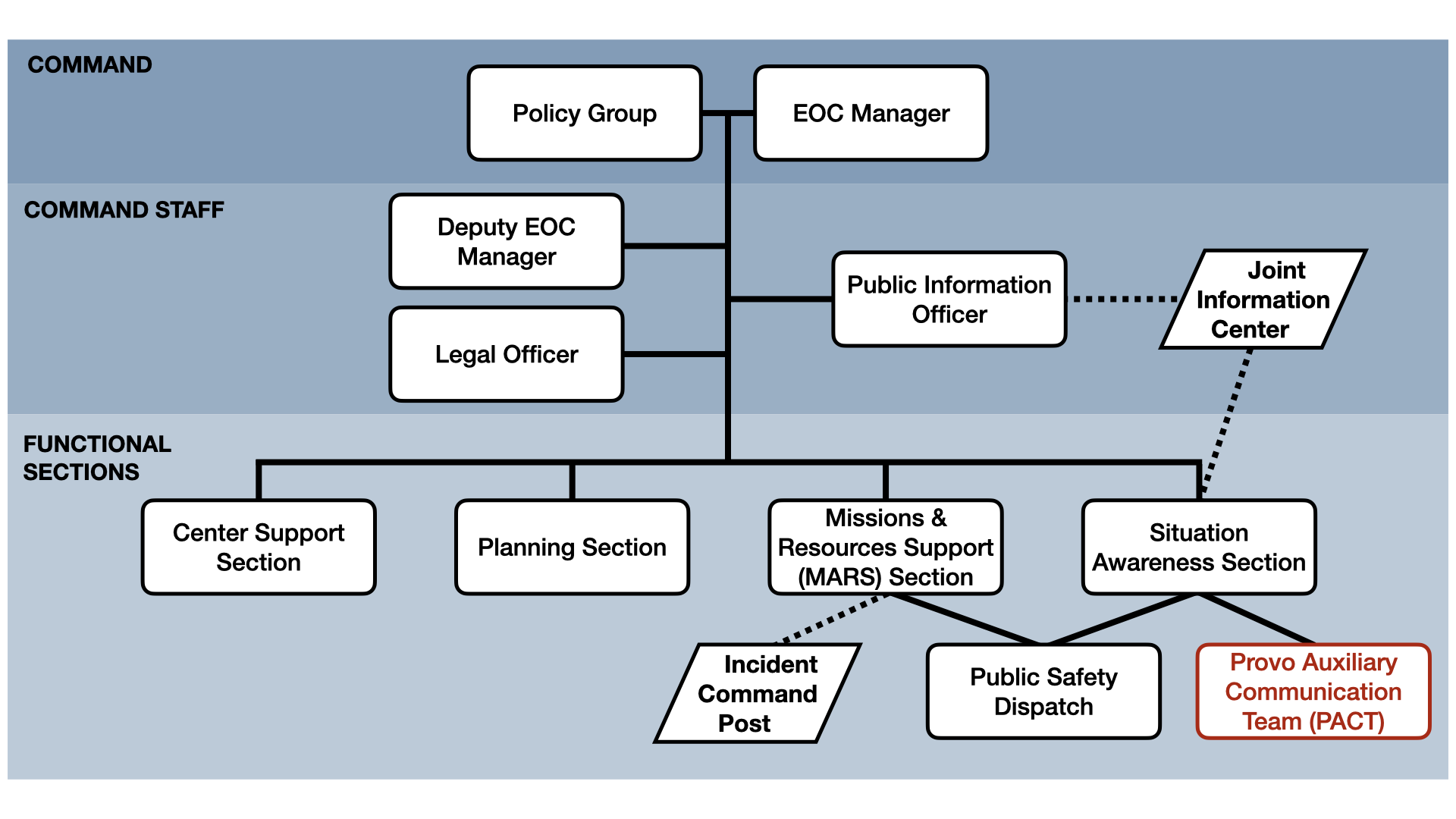
PACT is responsible for relaying information from the community to the EOC. This information enables the Situation Awareness Section to help city decision-makers understand field conditions, identify needs, and coordinate an appropriate response.
Information generally flows as follows:
- Community members report conditions or needs.
- PACT operators collect and relay those reports.
- Net Control organizes the incoming information.
- Net Control passes reports to the Situation Awareness Section.
- EOC staff use the information to support coordination and response decisions.
PACT does not replace emergency services or city departments. PACT supports Provo City by providing auxiliary communications and helping move information when normal communication systems are disrupted or overloaded.